


August 20, 2026
Decoding Web Application Development Costs
Trying to pin down web application development costs can feel like guesswork, but most projects land somewhere between $25,000 for a simple app to over $350,000 for a complex one. Where your project falls on that spectrum depends entirely on its features, design complexity, and the development team you hire.
Your Guide To Web Application Development Costs

Budgeting for a new web app is a lot like planning to build a house. You wouldn't walk up to a contractor and ask, "How much for a house?" without giving them the details. A small, pre-designed cottage is going to have a wildly different price tag than a custom-built mansion with unique architecture and smart home features. The same logic applies directly to software.
There’s no single price tag here; it's a spectrum. A simple marketing website with a contact form sits at one end, while a massive SaaS platform with real-time data and e-commerce sits at the other.
Understanding The Cost Spectrum
To give you a real-world starting point, the cost to develop a web application can range anywhere from $25,000 to over $350,000. We’ve seen many projects land somewhere between $60,000 and $1.2 million, all depending on the scope.
For startups and small businesses, a Minimum Viable Product (MVP) is often the smartest first step, usually falling in the $60,000 to $140,000 range. This covers the absolute must-have features, like user logins and core functionality, getting you to market without breaking the bank.
This guide will walk you through what drives those numbers up or down. If you're building from the ground up, getting a handle on startup budget and cost management is non-negotiable.
Think of your initial budget as the foundation for that house. A strong, well-planned foundation can support future additions and growth. A weak one will cause cracks down the road, leading to expensive repairs and limitations. A smart investment upfront saves you from much bigger headaches later.
To make this a bit more concrete, the table below breaks down what you can generally expect at different levels of complexity. It's a high-level look, but it should help you ballpark your potential investment and timeline.
Estimated Web App Development Costs By Complexity
| Complexity Level | Typical Cost Range | Estimated Timeline | Common Features |
|---|---|---|---|
| Simple | $25,000 – $60,000 | 2–4 Months | Basic UI, single-user roles, static pages, contact forms, simple admin panel. |
| Medium | $60,000 – $150,000 | 4–8 Months | Custom UI/UX, user profiles, third-party API integrations, payment gateways, dashboards. |
| Complex | $150,000 – $350,000+ | 8+ Months | Advanced security, real-time features, multiple user roles, complex backend, machine learning. |
This table gives you a frame of reference. Now, let’s dig into the specific factors that actually drive these costs and how you can keep them under control.
The Key Factors Driving Your Final Project Cost
Ever wonder why one web app might cost $25,000 while a seemingly similar one comes with a $250,000 price tag? It’s not magic. The final cost boils down to a handful of core decisions that dictate the time, talent, and resources needed to get your project across the finish line.
Think of it like building a custom home. A simple, one-story house using a stock floor plan is one price. A multi-level home with a unique architectural design, imported materials, and a smart home system is a completely different ballgame. The price of your web app is a direct reflection of the ingredients you choose.
These factors don't just add up; they multiply. A complex app with a fully custom design and several third-party connections will always be a significant investment. Let's dig into what these cost drivers are and why they matter so much to your budget.
Application Complexity and Scope
The single biggest factor in your web application development costs is complexity. I'm not just talking about the number of pages. The real driver is the depth of the logic running behind the scenes. A five-page marketing website is one thing; a SaaS platform with real-time analytics is another beast entirely.
Here’s what really determines complexity:
- Business Logic: How complicated are the rules your app needs to follow? A blog has simple logic. A logistics platform that has to manage multi-stop delivery routes with live driver tracking? That's wickedly complex.
- Number of Features: Every single function—from user logins and dashboards to payment processing and reporting tools—adds to the timeline. More features simply mean more code to write, test, and manage.
- Real-Time Capabilities: Features like live chat, instant notifications, or collaborative editing tools require a much more sophisticated backend architecture (using things like WebSockets) that's tougher to build and maintain.
Your project's scope is the "what" and "how" of the build. A tight, clearly defined scope keeps costs under control. On the other hand, a vague or constantly growing list of features—what we call "scope creep"—is the number one reason budgets go off the rails.
UI/UX Design Fidelity
How your app looks and feels is a make-or-break factor for getting users to stick around, and the level of custom work here has a huge impact on the price. A great user experience (UX) and user interface (UI) aren't just about pretty pictures; it's a deep process of research, wireframing, prototyping, and user testing to create something that feels natural and intuitive.
You generally have two options:
- Template-Based Design: This is your most budget-friendly route. Using pre-built themes or design kits gets you up and running fast, but you sacrifice originality and it may not perfectly match your brand or workflow.
- Custom UI/UX Design: This is where you build a unique design from the ground up, tailored specifically to your users. It costs a lot more upfront (think $5,000 to over $15,000 just for the design phase), but you get a superior product that gives you a real competitive edge.
A well-designed interface is like a clear path through a forest. It guides the user effortlessly. A poor one is an overgrown trail—users get lost, frustrated, and leave.
Technology Stack and Integrations
The specific programming languages, frameworks, and databases we use to build your app—what we call the technology stack—also influence the final cost. The right tech depends on what you need for performance, scalability, and security. For a great deep-dive into how a specific framework impacts expenses, check out this guide on Decoding React Native App Development Cost.
On top of that, modern web apps don't live on an island. They need to talk to other services through third-party APIs (Application Programming Interfaces), and each connection adds another layer of complexity and cost.
Common integrations include things like:
- Payment Gateways: Connecting to services like Stripe or PayPal.
- Social Logins: Letting users sign up with their Google or Facebook accounts.
- Mapping Services: Using Google Maps or Mapbox for location features.
- CRM/ERP Systems: Hooking into big platforms like Salesforce or SAP.
How Your Budget Is Allocated Across Development Phases
Figuring out web application development costs isn't about landing on a single magic number. It's about understanding where every dollar goes throughout the entire project. Building a web app isn't a one-and-done task; it's a journey with distinct stages, each with its own team, goals, and price tag.
Think of it like building a house. You don't just pay the construction crew. You have costs for the architect (planning), the interior designer (design), the builders (development), the inspector (testing), and then the ongoing utilities and upkeep (maintenance). Each phase is a crucial investment, and your budget gets strategically divided to cover all of them.
Let's break down where the money really goes.
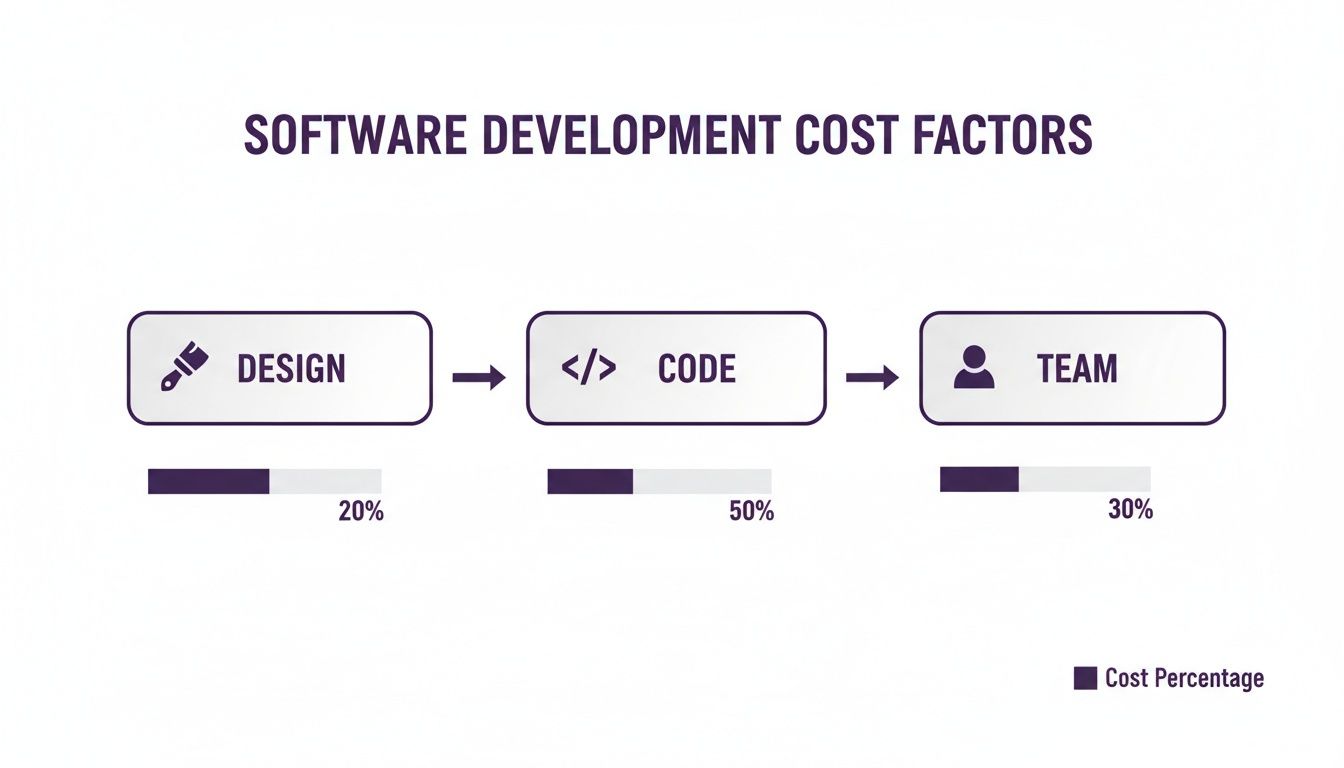
This visual gives you a quick snapshot of where the budget is weighted. While design is a vital piece of the puzzle, the real heavy lifting—and the bulk of the cost—comes from the actual coding and the expert team that brings your vision to life.
Phase 1: Discovery and Planning
This is where you draw the blueprints. Before a single line of code gets written, your team needs to dive deep into your business goals, figure out who you're building this for, and see what the competition is up to. It’s all about strategy and making sure you’re building the right thing.
This phase typically eats up only 5-10% of the total budget, but its value is massive. A solid discovery process stops you from making expensive mistakes and changing your mind halfway through the project.
Phase 2: UI/UX Design
With a clear plan in hand, the focus shifts to how the app will look and feel. This is the UI/UX (user interface/user experience) design phase. It’s not just about picking pretty colors; it’s about making the app easy, intuitive, and even fun to use. This is where wireframes, mockups, and interactive prototypes are born.
UI/UX design usually accounts for 15-20% of the budget. A good investment here pays off big time in user engagement and retention. For any serious website development for startups, this is a non-negotiable step to making a great first impression.
Phase 3: Development—The Core Build
Here we go. This is the most intense and expensive part of the journey, where designs become a real, working application. It’s generally split into two key parts happening at the same time:
- Frontend Development: This is everything the user sees and touches—the buttons, the forms, the layout. Developers use tools like JavaScript, React, or Angular to build the part of the app that runs in the user's browser.
- Backend Development: This is the engine under the hood. It’s the server, the database, and all the logic that makes the app work. This is where data is stored, processed, and kept secure.
The development phase is where the blueprint becomes a tangible structure. Just like a construction site, this is where the heavy lifting happens, requiring the most resources, time, and specialized skills to assemble the final product according to the plan.
This is, by far, the biggest slice of the budget pie, typically consuming 45-55% of the total. Depending on how complex the project is, the cost for just this phase can range from $3,000 to over $250,000.
Phase 4: Quality Assurance (QA) Testing
Before you pop the champagne, the app needs to be put through the wringer. The Quality Assurance (QA) team is like a pack of bloodhounds, sniffing out bugs, testing features on different devices, and making sure everything is secure and stable. This step prevents a broken, frustrating product from ever reaching your customers.
QA usually represents about 10-15% of the total cost. Trying to save money by skipping this is a classic mistake—it almost always costs you more down the road when you’re forced to fix bugs on a live app.
Phase 5: Deployment and Maintenance
Launch day has arrived! Deployment is the process of setting up the servers and pushing your app live for the world to see. But the job isn't done. Not even close.
Your app needs ongoing care to survive and thrive. This means server hosting, security updates, bug fixes, and performance monitoring. A good rule of thumb is to budget around 15-20% of the initial development cost per year for maintenance. This keeps your application secure, fast, and running smoothly long after launch.
Choosing The Right Pricing Model For Your Budget
When you’re ready to build a web app, picking a development partner is only half the job. The other half is figuring out how they’re going to charge you. For founders who don't come from a tech background, pricing models can feel like a maze, each with its own rules, perks, and pitfalls that will absolutely affect your web application development costs.
Getting this choice right is crucial for keeping your budget under control, maintaining project flexibility, and ultimately, ensuring your app succeeds. Let's break down the three standard approaches so you can pick the one that actually fits your business goals and financial reality.
The Fixed Price Model
Think of this like ordering off a menu at a restaurant. You know exactly what you’re getting and precisely what it will cost. The Fixed Price model is perfect for smaller, well-defined projects where the scope is crystal clear and isn't going to change. You agree on a specific list of features for one, single price.
The biggest plus here is budget certainty—no surprise bills. But its greatest strength is also its most significant weakness. There’s almost zero flexibility. If you decide you need a new feature or want to pivot midway through, you'll have to file a formal—and often expensive—scope change request.
The Time and Materials Model
This model is more like hiring a general contractor for a home renovation. You pay them for the hours they put in and the materials they use. With the Time & Materials (T&M) model, you pay an agreed-upon hourly or daily rate for the development team’s work. This approach is built for flexibility and is the go-to for complex projects where you expect requirements to evolve.
T&M lets you adapt and refine your product as you get real feedback from the market. The catch? The dreaded "scope creep," where the project quietly grows beyond its original vision, leading to budget overruns. This model demands you stay actively involved and communicate clearly to keep costs from spiraling.
The Fixed Price model offers a predictable path, but it's a rigid one. The Time & Materials model is a more flexible journey, but you must keep a firm hand on the map to avoid getting lost and running up the bill.
The Dedicated Team Model
Imagine hiring an entire, pre-vetted development department that plugs right into your company. The Dedicated Team model is a long-term partnership. You pay a consistent monthly fee for a team of developers, designers, and project managers who work only on your project.
This approach gives you the most control and is ideal for large-scale, ongoing projects or for businesses that need to beef up their in-house team. It's the best of both worlds: the deep expertise of an agency combined with the singular focus of an internal team. While it’s the most expensive option month-to-month, it often delivers the best value for complex, long-haul initiatives that need continuous development and deep product knowledge.
To make the decision a little easier, let's put these three models head-to-head.
Comparison Of Web Development Pricing Models
This table compares the three main pricing models to help you decide which is the best fit for your project's scope, budget, and flexibility needs.
| Pricing Model | Best For | Flexibility | Budget Control | Risk Level |
|---|---|---|---|---|
| Fixed Price | Small, well-defined MVPs with a rigid scope. | Low | High | Low (for client) |
| Time & Materials | Evolving projects that require agility and feedback. | High | Medium | Medium |
| Dedicated Team | Long-term, complex projects needing continuous work. | High | Low | High (for client) |
Ultimately, the best model depends entirely on your project's specific needs. A simple, straightforward app can thrive on a Fixed Price, while a more ambitious, evolving platform will almost certainly need the agility of a Time & Materials or Dedicated Team approach. Choose wisely
Real-World Cost Breakdowns For Different Web Apps
Theory is great, but let's talk real money. Seeing how web application development costs actually shake out on real projects makes everything click. To give you a better feel for budgeting, let's walk through three common scenarios, from a simple brochure site to a full-blown SaaS product.
Think of these as benchmarks. They’ll help you situate your own idea on the cost spectrum. Each one breaks down the features that drive the price, a realistic timeline, and the kind of team you'd need to bring it to life.
Example 1: The Simple Content-Driven Website
First up, imagine a sharp, modern website for a local business—maybe a design studio or a consulting firm. The goal here isn't complicated: show off a portfolio, lay out the services, and give potential clients a way to get in touch. It’s all about making a professional first impression online.
The features are lean but effective.
- Key Features:
- A clean, responsive design with 5-7 core pages (Home, About, Services, etc.).
- A simple Content Management System (CMS) so the team can easily update blog posts or add new projects.
- A basic contact form that sends inquiries straight to an email inbox.
- Essential SEO setup to get noticed by search engines.
A project like this doesn't need a huge crew. You can get it done with a project manager, a UI/UX designer, and a developer or two. The timeline is also pretty quick, which is why it's a popular starting point for so many businesses.
The costs stay low because the logic is simple. There are no user accounts, no payment processing, and no tricky third-party integrations. It's a focused, professional online brochure.
- Timeline: 2–4 months
- Team Structure: 1 Project Manager, 1 UI/UX Designer, 1-2 Developers
- Estimated Cost Range: $20,000 – $55,000
Example 2: The Mid-Complexity E-commerce Platform
Okay, let's level up. Picture a custom online store for a retail brand that's starting to take off. This web app has a much bigger job to do. It needs to handle transactions, keep track of inventory, and give hundreds of customers a secure and smooth shopping experience.
This is a big jump in complexity, which means a big jump in development hours and cost. You need a solid backend to manage all the products, orders, and customer data, plus a user-friendly front end that actually converts visitors into buyers.
- Key Features:
- Custom UI/UX for product pages, a shopping cart, and the checkout process.
- User accounts for customers to see their order history and save addresses.
- Payment gateway integration with a service like Stripe or PayPal.
- A powerful admin dashboard to manage products, inventory, and sales.
- Basic sales and customer analytics.
The team gets bigger, too. You'll need people who specialize in e-commerce security and backend systems. While the upfront investment is higher, the app is built to generate a direct return through sales. This same logic applies to mobile apps; for a closer look, our guide on the mobile app development cost breakdown offers a detailed analysis.
- Timeline: 4–8 months
- Team Structure: 1 Project Manager, 1 UI/UX Designer, 2-3 Developers (Frontend/Backend), 1 QA Specialist
- Estimated Cost Range: $60,000 – $150,000
Example 3: The Complex SaaS Product
Now we’re at the top of the mountain: a Software-as-a-Service (SaaS) platform. Think of a project management tool or a marketing automation platform. This isn't just a website; it's the entire business, built to serve thousands of paying customers with a deep, multifaceted feature set.
The complexity here is on another level. The app has to manage different user roles and permissions, handle subscriptions, process huge volumes of data, and connect with other services through APIs. Security, reliability, and the ability to scale are absolutely critical—the whole business depends on it.
The feature list for a SaaS product can be massive, but here are a few must-haves:
- Key Features:
- A multi-tenant architecture to securely serve many customers.
- Subscription management and recurring billing.
- Advanced user roles and permissions.
- Complex, interactive dashboards and data visualizations.
- Third-party API integrations (e.g., connecting to Google Calendar, Slack, etc.).
- Robust security protocols to protect sensitive data.
This is an all-hands-on-deck project. You need a full team of specialists, from product managers to DevOps engineers, to build and maintain it. The timeline is long, and the budget reflects the massive effort required to create a market-ready product from scratch.
- Timeline: 8+ months
- Team Structure: 1 Product Manager, 2 UI/UX Designers, 4-6 Developers, 2 QA Specialists, 1 DevOps Engineer
- Estimated Cost Range: $150,000 – $350,000+
Smart Strategies To Manage And Reduce Your Costs
Building a powerful web application doesn't have to break the bank. In fact, some of the most successful projects I've seen were built on smart, strategic decisions, not unlimited budgets. Your best tools for managing web application development costs are careful planning and a ruthless focus on what matters.
The key is to shift your mindset from "what could this be?" to "what does it need to be right now?" Get that right, and you'll control your budget without ever sacrificing the quality of your final product.
Embrace The Minimum Viable Product
If there's one piece of advice I give every founder, it's this: launch with a Minimum Viable Product (MVP). Think of it as the leanest, most essential version of your big idea. It has just enough core features to solve a real problem for your first users and prove your concept is viable.
Starting with an MVP is a financial game-changer for a few reasons:
- Slashed Initial Investment: You're only paying to build what is absolutely necessary. This cuts development time and upfront costs dramatically.
- Faster Time-to-Market: Getting your app into users' hands quickly means you can start collecting feedback—and maybe even revenue—months earlier.
- Data-Driven Decisions: Real user feedback is gold. It tells you exactly what to build next, so you stop wasting money on features nobody actually wants.
This approach keeps you from pouring your entire budget into an unproven idea. You get into a lean cycle of building, measuring, and learning, making sure every dollar you spend is guided by data, not just assumptions.
Prioritize Features and Leverage Open Source
Once you're committed to the MVP mindset, you have to get ruthless about prioritizing features. Not all features are created equal. I always recommend using a framework like MoSCoW (Must-have, Should-have, Could-have, Won't-have) to sort through your wishlist. For your first launch, you build the "must-haves" and nothing else.
An app packed with a dozen mediocre features is far less valuable than one with three core functions that work flawlessly. Prioritization isn't about cutting corners; it's about focusing your investment where it will make the biggest impact.
Another huge money-saver is tapping into open-source technologies. Using established frameworks, libraries, and content management systems can save thousands in licensing fees. More importantly, your team isn't building basic functionality from scratch, which massively cuts down on development hours. To see how these choices play out, our article on app development best practices digs into how your tech stack impacts the whole project.
Plan for The Future from Day One
Here’s a cost-saving tip that most people overlook: think about post-launch maintenance from the very beginning. An application built on a solid, scalable foundation will be infinitely cheaper to update and maintain down the road.
This means making smart choices about your technology stack and demanding clean, well-documented code from your developers. A little bit of foresight during the initial build can save you from an eye-wateringly expensive overhaul a year or two later. It’s all about balancing upfront cost with long-term value, and a good development partner will help you find that sweet spot.
Got Questions About Web App Costs? We've Got Answers.
When you're trying to figure out the budget for a new web app, a few key questions always come up. We hear them all the time. Let's break down the most common ones so you can plan with a bit more confidence.
How Much Should I Budget for Maintenance After Launch?
Here's something a lot of people forget: launch day is the starting line, not the finish line. Post-launch maintenance is a real, ongoing cost you need to plan for. A solid rule of thumb is to set aside 15-20% of your initial development cost every year.
So, if you spent $100,000 to build your app, expect to spend another $15,000 to $20,000 annually to keep it running smoothly. This isn't just for show—it covers the essentials like server hosting, security updates to fend off new threats, performance checks, bug fixes, and small feature tweaks. It’s what keeps your investment safe and effective.
Is It Cheaper To Hire A Freelancer, An Agency, Or An In-House Team?
Each path has its own price tag and trade-offs. The right answer really comes down to the size of your project and how much you want to manage yourself.
- Freelancers: They're often the most budget-friendly choice for small, tightly-defined tasks. But if your project is big or complex, juggling multiple freelancers and ensuring reliability can become a major headache.
- In-House Team: This gives you the ultimate control, but it's also the most expensive route. You're not just paying salaries; you're on the hook for benefits, equipment, office space, and all the other overhead that comes with full-time employees.
- Development Agency: This is usually the sweet spot. You get a complete team of specialists—designers, developers, project managers—all working together. They bring structured processes and can scale with your needs.
While an agency's hourly rate might look higher at first glance, their efficiency and all-in-one approach often mean a lower total cost to get a polished, market-ready product out the door.
A fixed-price contract is like buying a pre-packaged meal—you know exactly what you'll get and what you'll pay. It's perfect if you're certain you won't want any changes to the recipe.
Can I Get A Fixed Price For My Entire Project?
You absolutely can, but it’s a tool for a very specific job. A fixed-price contract works best when your project scope is crystal clear, exhaustively detailed, and you're positive nothing will change. It gives you predictability, but you trade away flexibility.
The moment you want to add a new feature or change direction, you’ll need a formal scope change order. That adds time and money to the project. For most new apps where you expect to learn and adapt based on user feedback, a more flexible model like Time & Materials is a much better fit.
Ready to turn your web app idea into a reality with a clear, predictable budget? Frozen Crow Inc. specializes in building high-performance web applications tailored to your business goals. Start your project with us today!


