


November 17, 2026
What is User Experience Design? Explore Key Principles & Benefits
User experience (UX) design is all about making technology feel human. It’s the art and science of ensuring every interaction you have with a product is as simple, logical, and even enjoyable as possible. This isn't just about pretty colors or cool fonts; it's about how a product actually works for the person using it.
So, What Is User Experience Design, Really?
Think of a UX designer as an architect, but for digital spaces instead of physical ones. An architect’s job isn't just to pick out the doorknobs and paint colors. They have to map out the entire flow of the house—how a family moves from the kitchen to the living room, whether the layout makes daily life easier, and if the space itself feels welcoming or just plain awkward.
That’s exactly what a UX designer does for a website, an app, or a piece of software. They’re blueprinting the entire journey a person takes, trying to solve their problems in the most effective and least frustrating way imaginable.
"User experience encompasses all aspects of the end-user’s interaction with the company, its services, and its products." — Don Norman, Cognitive Scientist & User Experience Architect
At its core, UX is built on empathy. It’s about putting yourself in the user's shoes to truly get a handle on what they need, what drives them crazy, and what they’re trying to accomplish. Aesthetics matter, of course, but they come second to this deep, human-centered understanding.
It’s Often Invisible
Here’s the thing about great UX: when it’s done right, you barely notice it. It just works. Think about using a well-designed ATM. The buttons are where you expect them to be, the steps are logical, and you walk away with your cash without a second thought. That seamless, invisible flow is the mark of fantastic UX.
On the other hand, we’ve all felt the pain of bad UX. It's that confusing website where you can’t find the search bar for the life of you, or the mobile app that keeps crashing right as you’re about to check out. Those moments of frustration are exactly what UX designers work so hard to prevent.
To pull this off, UX design stands on several key pillars that all work together. Let’s take a quick look at what makes up a solid user experience.
The Core Components of User Experience
This table breaks down the key pillars that create a complete and effective user experience.
| Component | What It Means for the User |
|---|---|
| Usability | The product is easy to learn and I can get things done without getting confused. |
| Usefulness | This actually solves a problem I have and gives me real value. |
| Accessibility | Anyone, regardless of their abilities, can use this product successfully. |
| Desirability | I actually enjoy using this; the design creates a positive feeling. |
| Credibility | I trust this product and the company that made it. |
In the end, it all comes back to people. User experience design is the essential bridge connecting complex technology to the humans who use it, making sure every digital interaction feels purposeful, straightforward, and satisfying.
Tracing the Roots of Human-Centered Design
You might think "user experience design" is a recent buzzword born in a Silicon Valley boardroom, but its core ideas have been with us for a long, long time. At its heart, the practice is all about one thing: understanding people. It’s about creating products and environments that actually work for them, a discipline built on a foundation of human-centered thinking that existed decades before the first computer flickered to life.
This focus on the human element isn't new. You can see it clearly in the early 20th century with industrial designers like Henry Dreyfuss. In his 1955 book Designing for People, he laid it all out.
"When the point of contact between the product and the people becomes a point of friction, then the industrial designer has failed."
That single idea—prioritizing the user’s comfort, safety, and satisfaction—was the bedrock for modern UX.
The Original Experience Pioneers
Long before we had digital interfaces, another pioneer was masterfully engineering immersive experiences: Walt Disney. He was absolutely obsessed with how guests moved through his theme parks, what they felt at every turn, and how each tiny detail wove together into a seamless story. Disney’s approach was essentially large-scale UX, meticulously crafting every step of the journey to spark joy and eliminate frustration.
These early examples prove the goal has always been the same: create systems that bend to human needs, not the other way around. This people-first mindset is the common thread connecting a well-designed telephone from the 1950s to the intuitive mobile app you used this morning.
Grasping the entire path a person takes is critical. That’s why tools that help visualize this process are so invaluable. Check out our recommended customer journey mapping software to see how today's designers are tackling this classic challenge.
When "User Experience" Got Its Name
The discipline really started to take its modern shape with the rise of personal computing. The term "user experience" was officially coined by cognitive scientist Don Norman in the early 1990s while he was at Apple.
Norman’s vision was bigger than just making an interface easy to use. He wanted to capture every single aspect of a person's interaction with a system—from the industrial design of the hardware and the graphics on the screen all the way down to the instruction manual.
This holistic view is what defines UX today. It’s not just one thing; it's the sum of all the parts that shape how someone feels about a product.
And while Norman gave it a name, the concept has roots that stretch back even further, from early efficiency studies to ancient practices for creating harmonious living spaces.
Understanding this history is so important because it shows that UX isn't just some fleeting trend. It’s a mature, vital discipline blending psychology, ergonomics, and design. It proves that whether you’re designing a physical tool or a complex app, the fundamental challenge never changes: building for people.
The Guiding Principles of Great UX Design
So, what separates a product you love from one that makes you want to throw your phone across the room? It's rarely about one flashy feature. The real difference comes down to a deep-seated commitment to a few core principles. These ideas are the bedrock of solid user experience, guiding every single decision a designer makes.
Think of them like the pillars holding up a bridge. If even one is shaky, the whole thing feels unstable. A product might look stunning but be a nightmare to actually use. Or maybe it’s functional but doesn’t solve a problem you actually have. Great UX only happens when these principles all work together in perfect harmony.
The secret sauce is a focus on user-centered design principles. By putting the user front and center, designers can create experiences that aren't just effective, but genuinely enjoyable.
Making It Effortless Through Usability
Usability is probably the most straightforward principle of the bunch. It all boils down to one simple question: Can people easily and efficiently do what they came here to do? If a user has to pause and figure out how to perform a basic task, your usability is failing them. It’s that invisible magic that makes an experience feel completely natural and smooth.
A classic example is a good e-commerce checkout. You add an item to your cart and glide through to payment in a few logical steps with zero confusion—that's high usability in action. The design simply gets out of the way. On the flip side, a checkout form that asks for tons of unnecessary info or hides the "next" button creates friction. That’s a textbook case of poor usability.
A design isn’t finished until somebody is using it. When that experience is frictionless, you’ve achieved good usability. It should feel like a natural conversation between the user and the product.
Designing for Everyone with Accessibility
Accessibility takes usability a step further by focusing on inclusivity. It’s about making sure people with a wide range of abilities can see, understand, and interact with your product. This means designing for folks with visual, auditory, motor, or cognitive impairments.
This isn't just about doing the right thing; it’s a smart business move that opens up your product to a much larger audience. Here’s what it looks like in practice:
- High-Contrast Text: Making sure text is easy to read against its background is a huge help for users with low vision.
- Alternative Text for Images: Writing descriptive "alt text" allows screen readers to explain images to visually impaired users.
- Keyboard Navigation: A site should be fully usable with just a keyboard, which is essential for people with motor disabilities.
When you bake these considerations in from the start, you end up with a stronger, more welcoming product for every single user.
Creating an Emotional Connection with Desirability
While usability is all about function, desirability is pure feeling. It’s the aesthetic and emotional pull that makes someone want to use your product. This is where the little things—slick visuals, clever micro-interactions, and thoughtful details—come together to create a genuinely positive vibe.
Imagine a weather app that doesn’t just spit out the forecast but does it with beautiful animations and a clean, calming layout. You don't just open it for information; you actually enjoy the experience. That emotional hook is what turns casual users into loyal fans. Getting desirability right is a huge part of great digital marketing because it builds brand loyalty and keeps people coming back. If you want to dive deeper, check out our guide on landing page optimization best practices.
Delivering Tangible Value
Finally, every great user experience has to deliver real, tangible value. This is the "why" behind the entire product. It can be usable, accessible, and desirable, but if it doesn't solve a real problem or meet a genuine need, it's destined to fail.
Value is the promise you make to your user: "Use this, and your life will get easier, more fun, or more productive." A budget-tracking app delivers value by helping people save money. A project management tool adds value by keeping teams organized. The design’s job is to serve this core purpose, making sure every feature helps solve the user’s problem. Without it, all you have is a beautifully designed, but ultimately useless, product.
How Designers Turn Ideas into Reality
Turning a great idea into a real, finished product isn't some magical act of creative genius. It's a structured, repeatable process. In user experience design, we rely on a proven framework to make sure what gets built is actually what people need and want. This process is our roadmap, guiding us from an initial problem all the way to a tested, validated solution—cutting out the guesswork and pumping up the value.
It all starts with curiosity. Seriously. Designers don't just jump into sketching screens or picking out color palettes. First, they act like detectives, diving deep into the world of their future users.
Stage 1: Understanding the User Through Research
The bedrock of any solid UX project is research. This is where we work to build empathy, to quite literally step into the user's shoes and understand their motivations, frustrations, and daily habits. The goal here is to gather cold, hard evidence that will shape every single decision we make down the line. Without this step, we’re just guessing.
This phase usually involves a mix of different fact-finding missions:
- User Interviews: One-on-one chats where we get to hear firsthand about someone's goals and struggles.
- Surveys: A way to collect hard numbers from a bigger group to spot common patterns.
- Observation: Simply watching people use existing products to see where they trip up in a real-world setting.
This deep dive is what separates good design from truly great design. It guarantees the team is solving a real problem, not just building something that sounded cool in a meeting.
Stage 2: Generating Creative Solutions in Ideation
Once the research gives us a crystal-clear picture of the problem, we switch gears to finding solutions. The ideation phase is all about creativity and teamwork. It’s basically a structured brainstorm where the team throws out a ton of ideas—no matter how wild—to tackle the user needs we uncovered.
This isn’t just a free-for-all, though. We use methods like storyboarding, sketching, and mind mapping to explore different angles. At first, the goal is quantity over quality. We want to cast a wide net and explore all the possibilities before we start narrowing things down to the most promising concepts. That collaborative energy is key to getting past the obvious answers and finding something truly effective.
Stage 3: Building and Visualizing with Prototypes
With some solid ideas on the table, it's time to make them real. Prototyping is where we create simple, interactive models of the product. These aren't the final, polished versions; think of them as early drafts designed specifically for getting feedback.
A prototype is really just a question you can touch and feel. It's a way of asking, "Is this what you meant?" or "Does this actually help?" without sinking a ton of money and time into development. Every prototype is a hypothesis waiting to be tested.
This process usually builds up in layers of detail:
- Wireframes: These are the bare-bones blueprints. Just black-and-white layouts focused purely on structure.
- Mockups: Now we add the visual flair—colors, fonts, and branding—to give it a more realistic look and feel.
- Interactive Prototypes: These are clickable models that mimic the final user experience, letting people take them for a proper test drive.
This infographic breaks down the core flow of this back-and-forth design process.
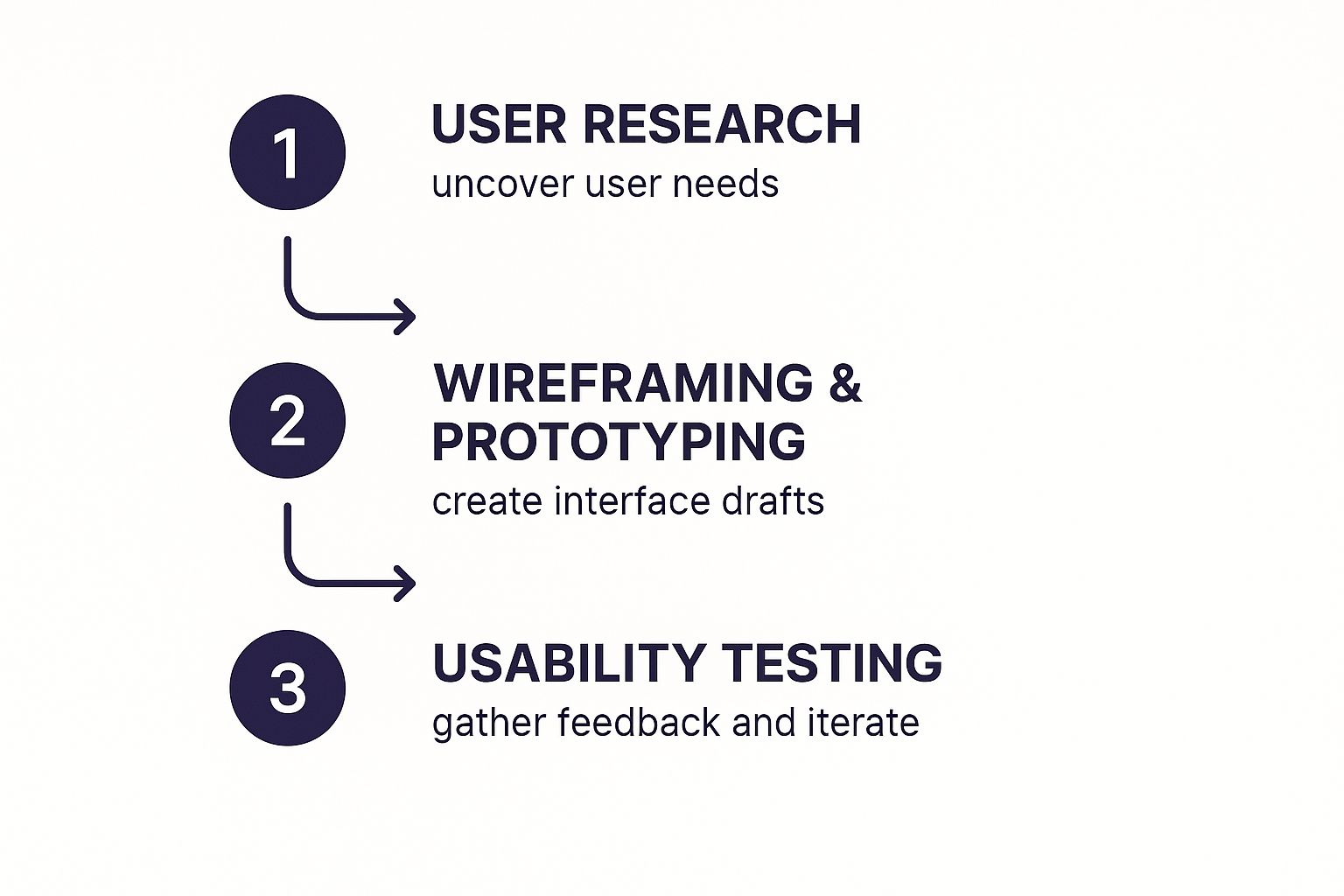
As you can see, the research directly feeds into building prototypes, which are then put to the test to see if they hold up.
Stage 4: Refining with Testing and Iteration
The final—and arguably most important—phase is testing and iteration. This is where we put our prototypes in front of real users to see what happens. To make sure our designs actually hit the mark, we run them through rigorous processes like mobile app usability testing. Watching someone interact with the design tells us what’s working, what's confusing, and what’s just plain broken.
The feedback we get here is pure gold. It gives us clear, actionable insights that point the way for the next round of improvements. The team then takes that real-world feedback, goes back to the prototype, and makes it better. This cycle of building, testing, and learning goes on and on until the product is as intuitive and effective as it can be. This structured method mirrors the systematic steps found in the complete https://frozencrow.com/mobile-app-development-process/, ensuring the final product is built with the user at its core.
Why Great UX Is a Competitive Advantage
Let's get one thing straight: investing in user experience isn't just about making things look pretty. It's a hardcore business strategy that hits the bottom line. In today's crowded market, your customer has a million choices, and the one thing that truly sets you apart is the experience your product delivers.
A thoughtful, intuitive design is no longer a nice-to-have. It’s a powerful competitive weapon.
Great UX also stops you from wasting a ton of time and money building the wrong thing. By putting user research at the heart of the process, teams can test ideas early and often. This ensures every feature you build solves a real, verified problem for a real person, slashing the risk of launching something nobody wants or understands.
Driving Business Growth with Superior Design
A truly seamless user experience translates directly into tangible business results. It’s that simple. When a product is easy and genuinely enjoyable to use, people stick around. They tell their friends. They become your biggest fans.
This isn't just theory. Think about how Airbnb completely blindsided the entire hotel industry. The big hotel chains had these clunky, complicated booking websites. Then Airbnb came along with a simple, beautiful platform that made finding and booking a place feel personal and easy. Their superior UX built trust and created an experience that competitors just couldn't copy.
A strong user experience isn't just an aesthetic choice; it's a strategic asset that builds trust and fosters loyalty. When users feel understood and valued by a product, they are far more likely to integrate it into their daily lives and champion it to others.
The benefits aren't just one-and-done, either. A well-designed product creates a ripple effect that boosts key business metrics over the long haul.
- Higher Conversion Rates: A clean checkout process or a dead-simple signup form removes friction. Less friction means more people complete the action you want them to take.
- Increased User Loyalty: When your product just works and solves problems without causing a headache, people have no reason to shop around for an alternative. That’s how you build loyalty.
- Reduced Support Costs: If an interface is self-explanatory, people can figure things out on their own. This empowerment means fewer support tickets and frees up your team to focus on bigger things.
The Evolution of UX as a Market Differentiator
The idea of UX as a market-defining force has exploded over the past few decades. The personal computing boom of the 1980s was a massive turning point. For the first time, the people using the software were the same people buying it. This put immense pressure on companies to actually care about usability in a way the old mainframe era never did.
The profession grew from just a handful of experts to an estimated 1 million by the early 2000s. By 1991, publications like PC Magazine were already dedicating a third of their review scores to usability. As the digital world keeps growing, UX is only becoming more central to a product’s success. The Nielsen Norman Group has a great deep-dive into the history and growth of the profession.
Today, this principle is more critical than ever. When two companies offer a similar product at a similar price, the one with the better user experience almost always wins. It's the ultimate tiebreaker that decides which products take off and which ones just fade away.
Where Do We Go From Here?
So, after digging into all the principles, processes, and a bit of the business side, what is user experience design really all about? At its heart, it’s empathy brought to life. It’s the quiet, often invisible work of putting yourself in someone else's shoes to make complicated tech feel simple.
That simple idea is what connects a person to a product. It's the thin line between a tool that makes you want to throw your computer out the window and one that actually helps you get things done. Every smooth checkout process, every app that just makes sense—that’s a designer who successfully figured out what someone needed and built a bridge to it.
And as technology keeps sprinting forward, this focus on the human side of things is only going to become more important.
Designing for Tomorrow's Tech
The way we interact with technology is already changing, moving beyond our screens and into the world all around us. Just think about the new design puzzles we have to solve:
- Artificial Intelligence: How do you design an AI that’s genuinely helpful and trustworthy, not just creepy or intrusive?
- Voice Interfaces: What does a good conversation with a smart speaker actually sound like? This isn't about buttons; it's about understanding how people naturally talk.
- Mixed Reality (AR/VR): When you start layering digital stuff over the real world, how do you make sure it feels intuitive instead of just confusing and disorienting?
No matter how smart the algorithm or how fast the processor, a technology’s success always comes down to how well it serves real human needs. The future isn't about packing in more features; it’s about packing in more humanity.
These new challenges just make the core ideas of UX that much more critical. The fundamental job is exactly the same: understand what people are trying to do, where they're coming from, and what’s getting in their way.
It doesn't matter what the tech looks like in ten or twenty years. Its success will always depend on how well it connects with the people it was built for. Now you have a solid grasp of what user experience design is, and hopefully, a newfound appreciation for the thoughtful work that makes your favorite apps and websites a pleasure to use.
Frequently Asked Questions About UX Design
As you start digging into user experience design, you'll find that a few questions always seem to surface. We've put together some quick, straightforward answers to clear up the most common points of confusion and help you get a solid footing in the field.
What Is the Difference Between UX and UI Design?
This is, without a doubt, the question we hear most often. It makes sense—the two are tightly connected, but they play very different roles.
Let's think about it like building a house.
User Experience (UX) design is the architectural blueprint. It’s the entire strategy behind the house's flow. Where do the rooms go? How do the hallways connect? Does the layout actually make sense for the people living there? UX is all about the structure, the function, and the overall feeling of the entire experience.
User Interface (UI) design, on the other hand, is all the interior decorating and finishing touches. It's the paint on the walls, the style of the furniture, the feel of the doorknobs, and where the light switches are placed. UI is what you see and physically interact with.
A beautiful house with a confusing layout (great UI, poor UX) is a nightmare to live in. A functional house with an ugly, mismatched interior (great UX, poor UI) is just unpleasant. You need both working together to create a home people actually love.
Do I Need to Know How to Code to Be a UX Designer?
The short answer is no. Knowing how to code is not a core requirement for a UX designer.
Your job is really about human-centered skills—things like research, empathy, communication, and creative problem-solving. You’ll spend most of your time in design tools like Figma or Sketch, figuring out user needs and crafting solutions, not writing lines of code.
That said, having a basic understanding of what's possible with code (think HTML, CSS, and a little JavaScript) is a huge plus. It helps you:
- Design solutions that are actually realistic for developers to build.
- Speak the same language as the engineering team and collaborate better.
- Know the technical limitations and opportunities from the start.
Think of it as a valuable bonus skill that makes you a stronger team member, not a replacement for your core design chops.
What Does a UX Designer Do on a Typical Day?
One of the best things about UX is that there’s rarely a "typical" day. What you work on completely depends on where your project is in its lifecycle.
Early on, a day might be all about research. You could be conducting one-on-one user interviews, digging through survey data to spot trends, or building out user personas that represent your audience. The goal here is just to deeply understand the problem you’re trying to solve.
A bit later, your day shifts to design and collaboration. This is where you’re sketching out ideas, building wireframes, creating interactive prototypes, and showing your work to the team and stakeholders to get their feedback. You’re turning all those early insights into something tangible.
Finally, your day might be spent on testing and iteration. This means running usability tests with real people to see where your design works and where it falls flat, gathering all that feedback, and then working with developers to make sure the final product gets built right.
Through it all, one thing is always constant: you are the voice of the user in every meeting and every decision.
At Frozen Crow Inc., we know that a great user experience is the bedrock of any successful digital product. If you're ready to build something that truly connects with your customers and drives real business results, check out our strategic digital marketing and development services at https://frozencrow.com.


