


November 17, 2026
Ecommerce Platform Comparison Guide
Picking the right ecommerce platform isn't just a technical choice—it's a business decision that will shape your store's future. This is the foundation for everything you do online, from how you manage inventory day-to-day to your ability to grow down the road. It’s not about finding the single “best” platform, but the one that truly fits your brand’s needs.
The right choice comes down to balancing three core elements: cost, customization, and scalability. Get this right, and you've set yourself up for success.
Choosing Your Ecommerce Platform Wisely
Stepping into the world of ecommerce platforms can feel like a lot to take in. You've got dozens of options, each promising to be the perfect solution. The real challenge is looking past the marketing speak to understand the fundamental trade-offs. Are you looking for the all-in-one simplicity of a platform like Shopify, or do you need the total creative freedom that something like WooCommerce offers?
Your decision here sets the tone for everything. It dictates your total cost of ownership, how easily you can scale up when sales take off, and even what your daily workflow looks like. Making a thoughtful choice now saves you from the headache and expense of a platform migration later. For a deeper dive, especially for new stores, understanding the nuances of choosing an ecommerce platform for small business success is a great next step.
At a Glance Platform Comparison
To cut through the noise, let's start with a high-level look at the big three. This table breaks down their core strengths and philosophies so you can quickly see where each one shines.
| Platform | Best For | Pricing Model | Key Strength |
|---|---|---|---|
| Shopify | Beginners & Fast Growth | Monthly Subscription | All-in-one simplicity |
| WooCommerce | Total Customization | Open-Source (You pay for hosting) | Unmatched flexibility |
| BigCommerce | B2B & Large Catalogs | Monthly Subscription (No transaction fees) | Powerful built-in features |
This snapshot makes the core differences clear. Shopify is all about getting you up and running fast with a polished, user-friendly experience. WooCommerce is for the builders—those who want to get their hands dirty and control every single detail. BigCommerce carves out a middle ground, packing a ton of advanced features right out of the box.
Market Share and Platform Popularity
Looking at market share can tell you a lot about a platform's reliability and broad appeal. It shows what thousands of other business owners have already vetted and chosen.
As of 2023, WooCommerce powers a massive chunk of the internet's online stores, holding an impressive market share of around 39%. Its popularity comes from its deep integration with WordPress, giving millions of users a familiar and incredibly flexible way to start selling.
This chart gives you a visual breakdown of where the top players stand.
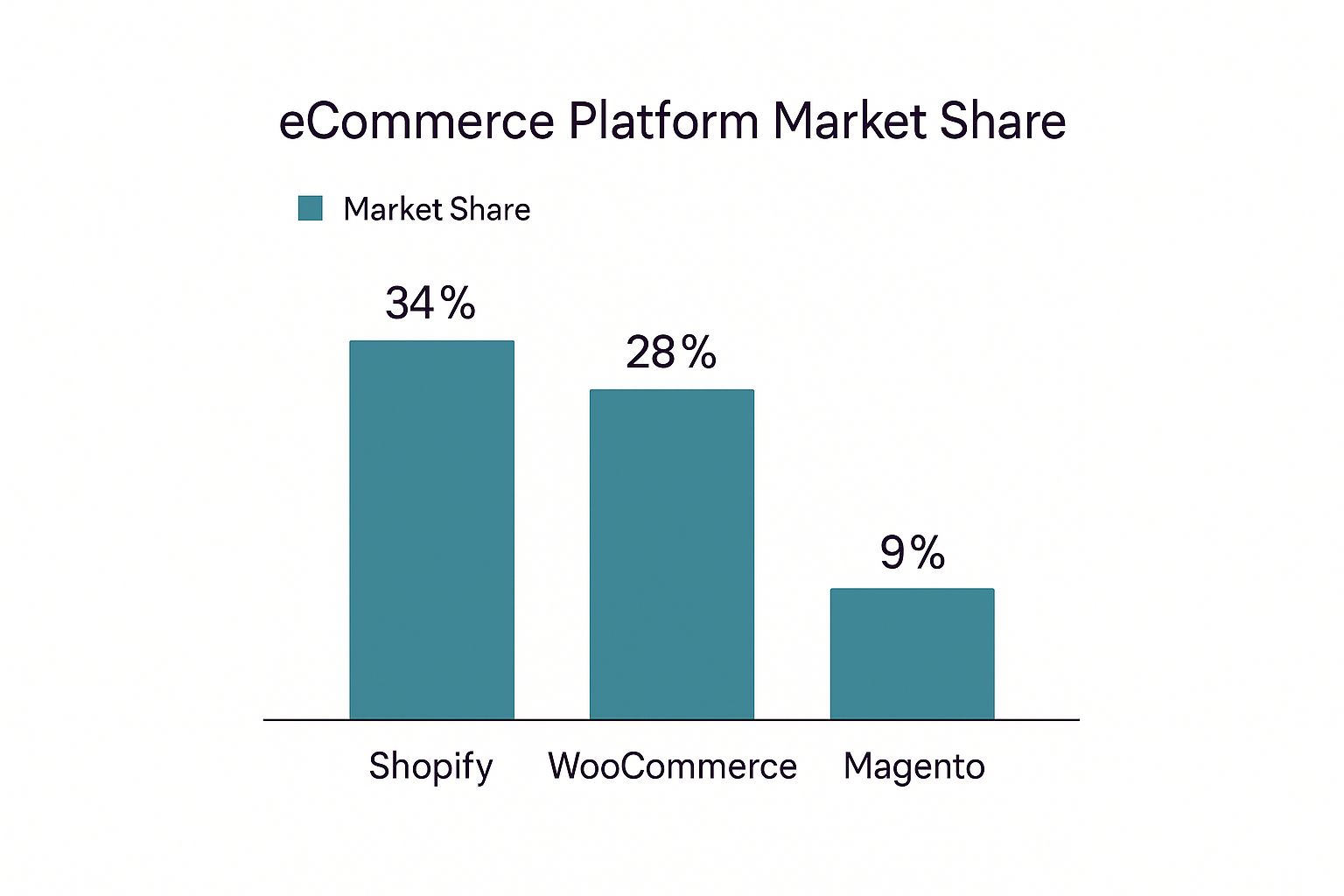
What's clear from the data is that there's no single winner. Both hosted solutions (like Shopify) and open-source platforms (like WooCommerce) have massive, loyal followings. This reinforces the most important point: the "best" platform is entirely relative to your specific business needs and technical comfort level.
Comparing Core Features and Daily Operations
Looks are one thing, but the real test of any ecommerce platform is how it feels day-to-day. A flashy dashboard doesn't mean much if managing your products or fulfilling orders is a chore. The right platform should slot into your workflow so smoothly you barely notice it's there—it should reduce friction, not create it.
This is where you really start to see the different philosophies behind Shopify, WooCommerce, and BigCommerce come to life. To make a smart choice, you have to look past the marketing and see how each one handles the everyday tasks that actually drive your business forward.

Product and Inventory Management
Managing your catalog is ground zero for your daily operations. The way each platform approaches this single task tells you a lot about who it was built for, from the solo entrepreneur to the massive retailer.
- Shopify's Approach: Shopify is all about simplicity and speed. Adding a new product feels guided and intuitive, with straightforward fields for your titles, descriptions, images, and prices. Its inventory system is clean and easy to grasp, making it perfect for anyone who needs to track stock across a few locations without getting bogged down in complexity.
- WooCommerce's Power: Since it's a WordPress plugin, WooCommerce's power lies in its almost infinite customizability. You can build out incredibly detailed product variations, add custom fields for things like personalization text, and create complex product categories. This flexibility is its biggest asset, but it also means more setup time and often requires extra plugins to get just right.
- BigCommerce's Built-in Strength: BigCommerce offers a powerful middle ground. It comes with robust tools for complex product options and custom fields right out of the box—no extra apps needed, which is a big win over Shopify. The system is designed from the ground up to handle large, complicated catalogs, making it a serious contender for stores managing thousands of SKUs.
Think of it this way: a t-shirt shop with basic size and color options will feel right at home on Shopify. But a store selling custom-built PCs with dozens of component choices would find the open-ended control of WooCommerce a much better fit.
Order Processing and Fulfillment
A smooth fulfillment process is what keeps customers happy and coming back. From the moment you make a sale, your platform needs to make the pick, pack, and ship process dead simple.
Shopify absolutely nails this with a refined, unified workflow. Its dashboard gives you a crystal-clear view of incoming orders, and its direct integrations with shipping carriers are second to none. For many merchants, this streamlined process is the number one reason they stick with the platform.
WooCommerce gives you flexibility here, but it demands a more hands-on approach. You'll be the one choosing and setting up shipping extensions. While powerful, this can lead to a more fragmented experience compared to Shopify's all-in-one feel. BigCommerce has strong native order management tools, but its third-party app ecosystem for fulfillment isn't quite as vast as Shopify's.
An optimized checkout and fulfillment process is your best defense against lost sales. One of the most effective ways to ensure customers complete their purchase is to understand and actively work to reduce cart abandonment. You can explore proven strategies in our guide on how to reduce cart-abandonment.
Integrating Payments and Marketing Tools
Your platform is also your command center for taking payments and running marketing campaigns. This covers everything from accepting credit cards and connecting to your email provider to featuring product videos. When you're sizing up platforms, it's critical to think about specific needs, like whether it can support high-quality ecommerce video production to really make your products pop.
Here’s a quick breakdown of how they stack up on integrations:
| Feature | Shopify | WooCommerce | BigCommerce |
|---|---|---|---|
| Payment Gateways | Excellent (Shopify Payments + 100+ others) | Excellent (Virtually any gateway via plugins) | Very Good (Major gateways, no transaction fees) |
| App Marketplace | Massive & Curated (8,000+ apps) | Limitless (50,000+ WordPress plugins) | Good & Focused (Growing selection of apps) |
| Marketing Tools | Strong native email and automation tools. | Relies on WordPress plugins (e.g., Mailchimp). | Good built-in features, less reliance on apps. |
At the end of the day, Shopify's main draw is its seamless "it just works" ecosystem. WooCommerce, on the other hand, offers total freedom for those who want to build their perfect setup piece by piece. BigCommerce finds a smart balance, building in a ton of features that cost extra elsewhere, which is a huge plus for businesses looking to keep costs down as they grow.
Understanding the True Cost of Each Platform
Picking an ecommerce platform based on the advertised monthly fee is a classic rookie mistake. It's like judging a car by its paint job while ignoring what’s under the hood. The real number you need to focus on is the total cost of ownership (TCO), which covers everything from transaction fees to the must-have apps that aren't included in the sticker price.
The subscription plan is just the starting line. All those little extra expenses can quickly pile up, turning what looked like a bargain into a serious monthly investment. Let's pull back the curtain and look at what you’ll actually spend on Shopify, WooCommerce, and BigCommerce.

Deconstructing Shopify’s Costs
Shopify is famous for its straightforward, tiered pricing, but your final monthly bill is almost always higher than the plan's price. The base subscription is just one piece of the puzzle.
First, you have to account for transaction fees. If you decide not to use Shopify Payments, you’ll get hit with an extra fee on every single sale—somewhere between 0.5% and 2%. That’s on top of what your payment processor is already charging you, and it can seriously erode your profit margins as you grow.
Then there’s the Shopify App Store. It’s incredibly powerful, but many of the apps you'll need for things like subscriptions, detailed analytics, or customer loyalty programs come with their own monthly price tags. It’s pretty common for a store to tack on an extra $50-$200 per month just to get the features that are baked into other platforms.
The real cost of Shopify isn't the plan, it's the ecosystem. Budgeting for apps isn't optional—it's essential for building a competitive store. Plan for these costs from day one so you don't get blindsided.
Calculating WooCommerce’s True Expenses
The "free" label on WooCommerce is both its greatest selling point and its biggest misconception. Sure, the software itself doesn’t cost a dime, but running a professional-grade store on it absolutely does. You’re on the hook for building and paying for the entire setup.
Here’s where your money will really go with WooCommerce:
- Quality Hosting: This is completely non-negotiable. Skimping on hosting gets you slow load times and glaring security holes. Be prepared to spend $25 to $100+ per month for a reliable host that can handle real ecommerce traffic.
- Premium Plugins: To get anywhere near the out-of-the-box functionality of Shopify or BigCommerce, you’ll be buying paid extensions. Think payment gateways, advanced shipping rules, and subscription tools. These often have annual license fees that can easily add up to $300-$500 per year for a decently equipped store.
- Developer Help: Unless you’re a coder, you’ll probably need to hire a developer for the initial setup, fixing bugs, or making custom tweaks. This can become a huge and unpredictable expense.
While you get total control, the TCO for a secure, feature-rich WooCommerce site often ends up being more than the entry-level plans of its hosted competitors.
Analyzing BigCommerce’s Pricing Model
BigCommerce tries to win you over by eliminating transaction fees on all its plans—a huge plus compared to Shopify. This means you keep more of your revenue from every sale, which is a big deal when you're watching the bottom line. Their plans also come loaded with built-in features, so you won’t have to lean on as many paid apps.
But there’s a catch, and it’s a big one: annual revenue caps. Each pricing tier is tied to a sales threshold. As soon as your store's trailing 12-month revenue crosses that line, you're automatically bumped up to the next, more expensive plan. For instance, the standard plan tops out at $50,000 per year.
This model makes your costs predictable, but it can feel like you're being penalized for growing quickly if you hit those caps ahead of schedule. It's a trade-off: you get more built-in tools and zero transaction fees, but your subscription cost is directly linked to your success. To avoid surprises, you have to be realistic with your sales projections to know what your BigCommerce expenses will look like long-term.
Evaluating Scalability for Long-Term Growth
Choosing a platform for your startup is one thing. Choosing one that can still support you when your business becomes a household name is something else entirely. Scalability isn't just about handling more traffic; it’s about whether your platform’s core architecture can manage high-volume sales, complex operations, and global expansion without buckling under the pressure.
This is a critical part of any ecommerce platform comparison. A poor choice here can slam the brakes on your growth. A platform that feels perfect today might become a frustrating bottleneck tomorrow. Just imagine your product goes viral overnight or you're staring down the barrel of a Black Friday traffic surge. Your platform’s ability to perform flawlessly is the real test.

The Role of Hosting in Scalability
The biggest difference in how these platforms scale often boils down to one thing: hosting. Shopify and BigCommerce are hosted solutions, which means they handle all the server infrastructure for you. WooCommerce, on the other hand, is self-hosted, putting that responsibility squarely on your shoulders.
-
Shopify's Managed Infrastructure: When you go with Shopify, especially Shopify Plus, you’re buying into an ecosystem built from the ground up for high performance. They manage the servers, security, and bandwidth, making sure your store stays online even during massive traffic spikes. That peace of mind is a huge selling point for anyone who wants to focus on growing their business, not managing servers.
-
WooCommerce’s Hosting Dependency: With a WooCommerce store, your scalability is only as good as your hosting plan. A cheap, shared hosting package will absolutely crumble during a sales rush. To scale effectively, you have to invest in premium managed WordPress hosting or even a dedicated server, which adds significant cost and technical know-how to the equation.
Comparing High-Volume Capabilities
When sales volumes really take off, each platform starts to show its true colors. You can see this reflected in the market share data, which tells a pretty interesting story.
In the ecommerce market, Shopify and WooCommerce are the clear front-runners. Shopify has a slight edge with 26.2% of the market, while WooCommerce is close behind at 20.1%. But look closer at high-traffic sites, and the gap widens: Shopify powers 28.8% of the top 1 million ecommerce websites, compared to WooCommerce's 18.2%.
This data suggests that while both are incredibly popular, Shopify's all-in-one architecture is often the go-to choice for businesses operating at a larger scale. BigCommerce also shines here, with its focus on built-in, enterprise-grade features designed to handle high transaction volumes without forcing you to bolt on app after app.
As your business grows, you'll also find that scaling content creation with AI becomes a key part of your long-term strategy.
Think about it this way: a business experiencing rapid international growth would find Shopify Plus’s ability to create dedicated storefronts for different regions a massive advantage. A WooCommerce store owner would have to manually configure a complex multi-site setup and pray their hosting could handle the global traffic load. BigCommerce strikes a nice balance, offering robust multi-currency and international shipping features out of the box—giving you a strong, scalable foundation without the Shopify Plus price tag.
Ultimately, Shopify offers managed scalability, WooCommerce provides conditional scalability that depends on your own investment, and BigCommerce delivers built-in scalability geared for growing businesses.
Getting Your Store’s Look and Feel Just Right
A customer’s first impression of your brand is almost always visual. That’s why design flexibility isn't just a feature—it’s at the heart of choosing the right ecommerce platform. How much control you have over your store's appearance can mean the difference between a generic, cookie-cutter site and a memorable, branded experience. This is one of the biggest areas where Shopify, WooCommerce, and BigCommerce really show their different philosophies.
If you need to get a professional-looking store up and running fast, Shopify is hard to beat. Its theme editor is famous for being incredibly intuitive, letting just about anyone make major changes to colors, fonts, and layouts without writing a single line of code. The Shopify Theme Store is full of polished, mobile-ready designs that just work right out of the box.
But that simplicity comes with trade-offs. While the themes look great, truly unique, ground-up customization is tough unless you’re on the expensive Shopify Plus plan or you’re a pro with their Liquid coding language.
When You Need Total Creative Control
On the complete other end of the spectrum, you’ve got WooCommerce. Since it’s a plugin for WordPress, its customization potential is practically infinite. You aren’t locked into a specific theme framework at all. Instead, you have thousands of WordPress themes and incredibly powerful page-builder plugins like Elementor or Beaver Builder at your fingertips.
This gives you absolute creative freedom. If you can dream it up, you can probably build it with WooCommerce. This is perfect for brands that need a completely custom user journey or have very specific design needs that a pre-built theme just can't handle.
For a brand whose identity is built on a unique digital experience, WooCommerce offers unmatched control. The ability to modify everything from the checkout page to product layouts without platform restrictions is its greatest strength, but this power comes with the responsibility of managing updates and potential plugin conflicts.
The Developer-Friendly Middle Ground
BigCommerce carves out a smart middle path with its Stencil theme framework. It gives you a simple visual editor for quick tweaks, much like Shopify, but it also hands developers a modern, powerful toolkit for deeper changes. Stencil lets you edit the site offline, see changes in real-time, and get full access to the theme’s source code. Agencies and brands with their own dev teams love it for this reason.
This makes BigCommerce a fantastic choice for businesses that want more technical control than Shopify gives them but don't want the full maintenance headache of a self-hosted WooCommerce site. It's a structured but flexible environment for building sophisticated, fast-loading storefronts.
So, how does this shake out for different business needs?
- Shopify: Best for getting started quickly. It's the go-to for merchants who want a beautiful, professional store live yesterday, without needing a developer.
- WooCommerce: Best for total control. If your brand demands a one-of-a-kind, custom-built site and you have the technical skills (or budget) to back it up, this is your platform.
- BigCommerce: Best for scaling with customization. It hits the sweet spot for growing businesses that need a stable, supported platform but also want the power to create a highly customized experience.
Ultimately, your decision hinges on a simple trade-off: do you need out-of-the-box simplicity, or is absolute creative freedom the most important thing? Your answer will point you straight to the platform that fits your brand’s vision and your team’s capabilities.
Alright, let's break down which platform actually makes sense for your business.
We’ve already torn apart the features and pricing of the top contenders. Now comes the most important part: matching the right tool to the right job. Picking your e-commerce platform isn't about finding the one with the most bells and whistles; it’s about aligning its core strengths with where your business is right now and where you plan to take it.
What works for a solo founder launching their first product is almost never the right fit for a global enterprise. So, let’s skip the generic pros and cons and get straight to practical recommendations for three common business types.
For Solopreneurs and Startups: Shopify is the Clear Winner
If you're a one-person show or a brand new business, your most valuable resource is time. The main goal is to get a professional, working store online fast, without getting tangled up in technical weeds. This is exactly where Shopify shines.
Shopify’s all-in-one approach just works. You don't have to hunt for a hosting provider, stress about security patches, or deal with server issues. Its drag-and-drop editor is intuitive, and the themes look great on mobile right out of the box. You can genuinely go from idea to a beautiful, launched store in a single weekend.
Shopify’s guided setup is built for people who aren't developers. It handles the technical headaches so you can pour all your energy into what truly matters early on: perfecting your products and getting those first customers.
For Growing Businesses Craving Customization: The Choice is WooCommerce
Once your business starts to pick up steam, your needs get more specific. Suddenly, you might need a completely unique checkout flow, a highly tailored product page, or a deep integration with some niche software. For the business owner who wants total control over their digital storefront, WooCommerce is the way to go.
Because it's built on WordPress, WooCommerce offers a level of flexibility that's hard to beat. You have an ecosystem of over 60,000 plugins at your fingertips and the ability to tweak every single line of code. It’s perfect for businesses that have hit the ceiling of template-based systems and have the in-house know-how (or a budget for a developer) to manage it. The trade-off for more hands-on work is complete and total freedom.
For Large B2C and B2B Operations: BigCommerce is the Best Fit
For established businesses, especially those juggling massive product catalogs or complex B2B sales, the game changes. The focus shifts to powerful, built-in features and predictable costs. BigCommerce was engineered for exactly this kind of scale, delivering enterprise-level tools without the eye-watering price tag of something like Shopify Plus.
Its biggest selling point? The zero transaction fee policy on all plans, which means more profit in your pocket on every single sale. BigCommerce also comes loaded with advanced tools from the get-go, like complex product filtering, multi-currency selling, and B2B features like customer-specific pricing. This means you aren't as reliant on a pile of third-party apps, giving you a more stable and powerful foundation to run your operations.
Of course, no matter which platform you choose, you’re still competing in a world dominated by giants. It’s worth remembering that Amazon alone captures a staggering 37.6% of the U.S. online retail market, with Walmart trailing at a distant 6.4%. This just underscores how vital it is to build a strong brand on a platform you own and control. You can see more details in this report on the current state of ecommerce in the U.S..
Ultimately, the best platform is just a starting point. A strong brand and smart marketing are what turn that storefront into a success. Once you're live, your very next step is to get people in the door. To hit the ground running, check out our guide on how to increase website traffic and start building momentum from day one.
Frequently Asked Ecommerce Platform Questions
Diving into the world of ecommerce always brings up a lot of questions. We've been in the trenches with countless merchants, and we've heard them all. This last section cuts through the noise and gives you straight answers to the most common things people ask when choosing a platform.
What Is the Easiest Ecommerce Platform for a Complete Beginner?
For anyone just starting their journey, the answer is almost always Shopify. It was built from the ground up to get you from zero to selling as fast as possible, without the technical headaches.
The whole experience is designed for non-coders. The setup guide literally holds your hand through every step, from adding that first product to getting paid. You don't have to think about hosting, security updates, or server problems—Shopify handles all of it behind the scenes. Its dashboard is clean, the drag-and-drop editor is intuitive, and it lets you focus on what really matters: your products and your customers.
The real magic of Shopify for a newcomer is that it’s an all-in-one package. It strips away all the friction that trips up new business owners, giving you a stable and secure launchpad.
Can I Migrate My Online Store to a Different Platform Later?
Yes, you can absolutely move your store to a new platform down the road. But be warned: it's a major project, not a simple switch. It's a complex process that demands careful planning to move all your precious data—products, customer lists, order history, and all your content pages.
Think of it like moving a house. The general steps involve:
- Data Export: Packing up all your data from your current platform.
- Data Mapping and Import: Unpacking that data and making sure it fits correctly into the new platform's structure.
- Design and Theme Setup: Rebuilding the look and feel of your store from scratch on the new system.
- SEO and Redirects: Setting up 301 redirects is a must. This tells Google where your old pages have moved, so you don't lose all your hard-earned search rankings.
Platforms like Shopify, BigCommerce, and WooCommerce know this is a big deal, so they offer migration tools or partner with services like Cart2Cart to help automate things. Even with those tools, it’s a serious undertaking that often requires a technical hand to pull off smoothly without losing data or suffering from costly downtime.
How Important Are SEO Features in an Ecommerce Platform?
Built-in SEO features aren't just important—they are absolutely critical to whether your store sinks or swims. Good SEO is what gets your products in front of people searching on Google. Without it, you're basically invisible to most of your potential market.
A solid ecommerce platform gives you the keys to your on-page SEO. You need that control to tell search engines what your pages are about and why they should rank them. When you're looking at any ecommerce platform comparison, make sure it includes these non-negotiables:
- Customizable URLs: The power to create clean, keyword-rich URLs.
- Editable Meta Tags: Full control over title tags and meta descriptions.
- Site Speed: A platform built for speed, since fast-loading pages are a huge ranking factor.
- Mobile Responsiveness: Themes and designs that look and work perfectly on a phone.
Strong SEO is the engine for organic traffic, which is hands-down the most cost-effective way to get customers. Good platform tools make it easier to nail the fundamentals that determine how many people even find your store. Once they get there, learning how to improve website conversion rates is the next crucial step in turning those visitors into actual buyers.
Ready to elevate your digital strategy and drive real growth? Frozen Crow Inc. specializes in data-driven marketing and IT solutions that deliver measurable results. Get your free marketing audit and start building your custom growth plan today.


